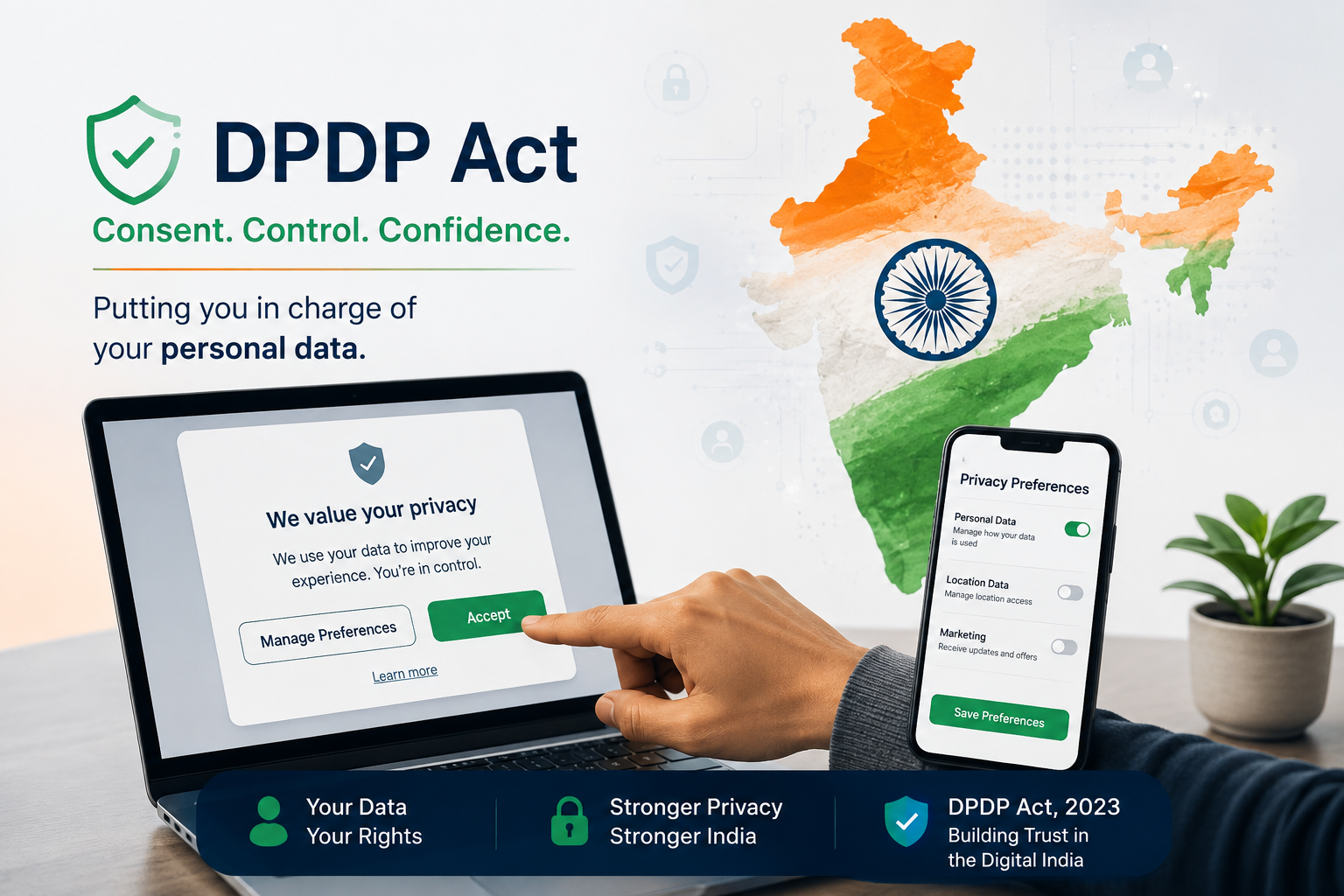

Your website has a consent banner. It slides up politely, shows two buttons, and disappears after one click. Everyone on the team feels safe. Yet here is the uncomfortable question: if a regulator asked you to prove what a single visitor agreed to last March, could you do it?
For most websites, the honest answer is no. A consent banner is only the visible tip of a much larger system. Underneath it, the real work of consent either happens or quietly fails. This guide walks through five warning signs that show where the failure usually hides.
Why a Consent Banner Alone Does Not Equal DPDP Consent
Many teams treat the consent banner as the finish line. Naturally, that feels logical, because the consent banner is the part users see. However, the Digital Personal Data Protection Act, 2023 (DPDP Act) does not judge your interface. Instead, it judges what actually happens to personal data.
Consider what the law asks for. Consent must be free, specific, informed, unconditional, and unambiguous. Moreover, it must come through a clear affirmative action, and it must be limited to the purpose you stated. In addition, the Act says the data fiduciary carries the burden of proving that notice was given and consent was obtained.
That last point changes everything. A consent banner shows that you asked. It does not show that you recorded the answer, respected it, or can produce it later. As a result, a consent banner without proper infrastructure behind it is closer to a stage prop than a safeguard.
Timing matters too. DPDP enforcement is phased, and the full substantive obligations apply from May 2027. Consequently, the months before that date are the cheapest time to find your gaps. After that date, the same gaps become exposure.
So how do you know whether your setup is genuinely sound? Start by checking for these five signs.
Sign 1: Your Consent Banner Bundles Every Purpose Into One Click
To see how this plays out, picture a visitor landing on your site. The consent banner says, “We use cookies to improve your experience.” One button says “Accept All.” Another says “Manage.” Behind that single click sit analytics, advertising, personalisation, and data sharing with partners.
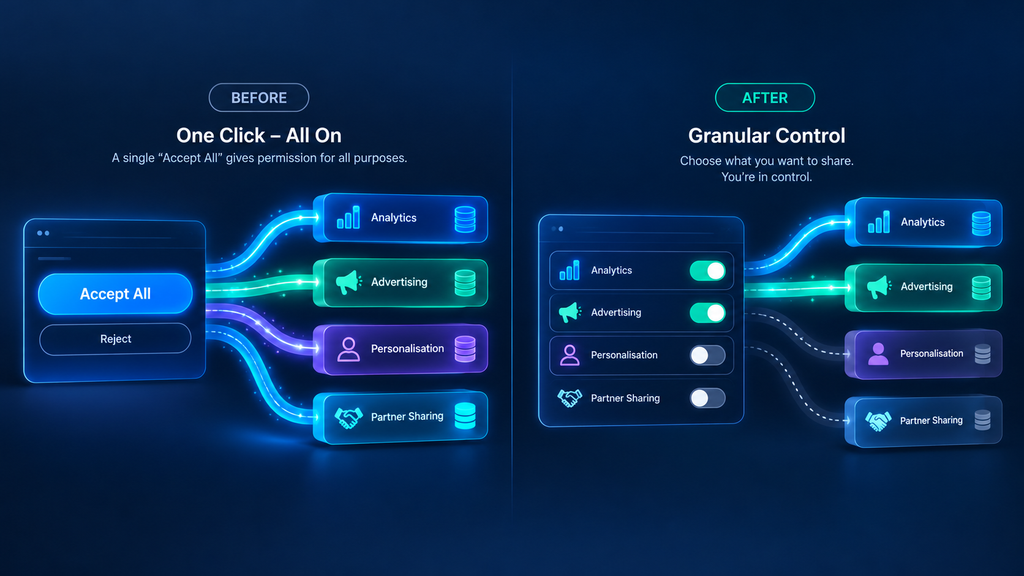
Does that sound familiar? If so, you have the most common consent problem on the internet today.
Why Bundled Consent Fails
The DPDP Act expects consent to be specific. Therefore, each purpose needs its own clear request. A visitor who agrees to analytics has not agreed to advertising. Likewise, a customer who shares an email for order updates has not agreed to promotional campaigns.
Bundling looks efficient, but it creates three risks at once:
- It weakens the “specific” requirement, because one click covers many uses.
- It weakens the “unconditional” requirement, because users cannot say yes to one thing and no to another.
- It makes withdrawal messy, since pulling back one purpose means pulling back everything.
A Quick Test
Open your consent banner in a private browser window. Then ask three questions. Can a visitor accept analytics but refuse advertising? Is every purpose described in plain words? Is “Reject” as visible as “Accept”?
If any answer is no, your consent banner is bundling. Furthermore, a pre-ticked box does not count as a clear affirmative action, so check that nothing is selected by default.
What Good Looks Like
Good consent is purpose-wise. In practice, each processing activity gets its own short explanation and its own switch. For example, a fintech site might separate identity verification, credit scoring, marketing messages, and partner sharing. Consequently, the user stays in control, and your records stay precise.
Notably, this also helps your business. When consent is granular, you know exactly which data you may use for which campaign. That clarity prevents expensive mistakes later. For instance, your marketing team can build an email list from people who actually agreed to receive offers, instead of guessing. Consequently, campaigns perform better, and complaints drop.
Sign 2: Withdrawing Consent Is Harder Than Giving It
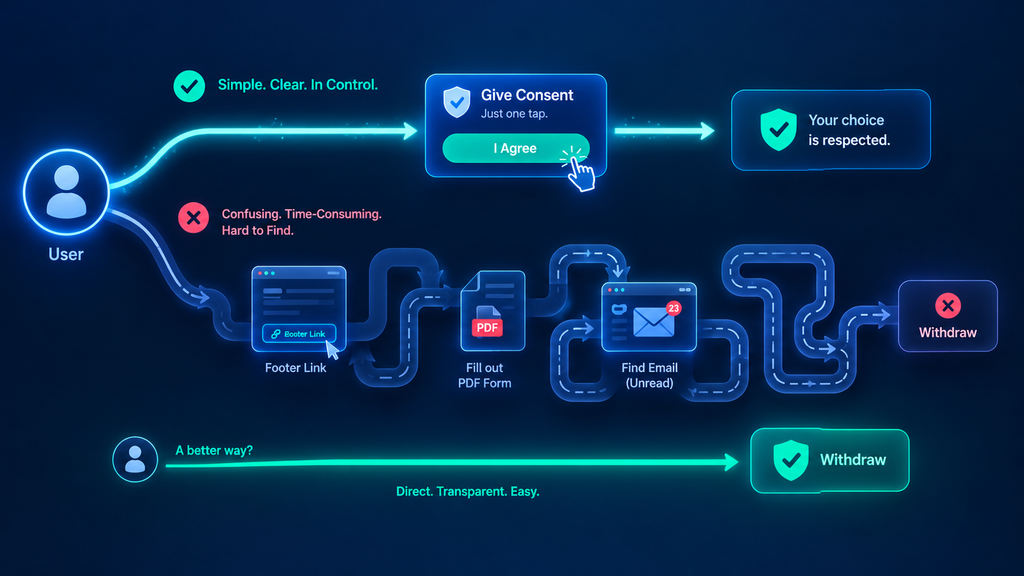
Now flip the scenario. A visitor clicked “Accept” two months ago, and now they want out. Where do they go?
On many websites, the answer is a buried footer link, a PDF form, or an email address that nobody monitors. Meanwhile, giving consent took one tap. That imbalance is exactly what the law targets.
The Symmetry Rule
The DPDP Act states that withdrawing consent should be as easy as giving it. In practice, if consent took one click, withdrawal should not take five. Additionally, the option should be easy to find, not hidden three menus deep.
Think of it like a subscription. Specifically, if signing up takes ten seconds and cancelling needs a phone call, users notice. Regulators notice too.
Warning Signs on Your Own Site
Next, check your website for these patterns:
- The consent banner appears once and never again, so users cannot reopen their choices.
- Withdrawal needs a login, even though consent did not.
- The only route is “email us at the privacy address.”
- Withdrawal changes a toggle but nothing else in your systems.
That last pattern is the sneakiest. Therefore, it deserves a closer look.
Withdrawal Is a Backend Problem
Here is the insight many teams miss. A withdrawal button is a front-end feature, but withdrawal itself is a backend event. When a user withdraws, your analytics tool, your CRM, your email platform, and your ad pixels all need to stop processing. If they keep going, the toggle is only decoration.
As a result, the right question is not “do we have a withdrawal link?” Instead, ask, “how fast does a withdrawal reach every system that touches this person’s data?” If the answer is “someone updates a spreadsheet on Fridays,” you have found a real consent problem.
Importantly, the same logic applies to mobile apps. For a deeper look, read our guide on DPDP compliance for mobile apps, consent and withdrawal.
Sign 3: Trackers Fire Before the Visitor Clicks Anything
This sign is easy to test and surprisingly common. Open your site in a fresh browser. Before touching the consent banner, open the developer tools and watch the network tab. What loads?
If analytics scripts, advertising pixels, or session recorders already fire, your consent banner is cosmetic. In other words, the data collection started before the question was asked.

The Tag Manager Trap
Why does this happen? Usually, the consent banner and the tags live in different places. Marketing adds a new pixel through a tag manager. Meanwhile, the consent banner was configured months earlier by someone else. Consequently, nothing connects the two.
Similarly, third-party plugins often load their own scripts. A chat widget, a video embed, or a social share button can each set identifiers or send data to outside servers. In fact, many teams do not even know the full list.
Consent Must Control the Switch
Real consent management works like a gatekeeper. The consent banner records the choice, and then every script checks that choice before running. If the visitor declines advertising, the advertising pixel never loads. If they withdraw later, it stops at once.
This is called consent enforcement, and it separates a working system from a decorative one. Without it, the consent banner and the data flow live in two different worlds.
How to Audit Your Trackers
To begin, run this short routine:
- List every script, pixel, plugin, and embed on your key pages.
- Match each one to a clearly stated purpose.
- Test the site before consent, after consent, and after withdrawal.
- Fix every script that behaves the same way in all three states.
Admittedly, this takes an afternoon. However, it often reveals more risk than any policy review.
Sign 4: You Cannot Prove What Anyone Agreed To
Now imagine a complaint reaches the Data Protection Board. A user claims they never agreed to marketing messages. Your team replies, “Yes, they did.” Then comes the follow-up: show us.

What can you actually produce? This is where many organisations discover that a consent banner is not a record.
Proof Is Part of the Law
Remember, the burden of proof sits with you. Therefore, you need evidence for each consent event: who agreed, to which purpose, on which date, under which notice version, and through which channel. You also need a record of every change and every withdrawal.
Without that, your defence rests on trust. Unfortunately, regulators rarely accept “trust us” as an answer.
The Weak Spots in Typical Records
Consider how most sites store consent today. A cookie in the browser. A column in a database. Perhaps a line in a log file. Each of these has problems:
- Browser cookies disappear when users clear them.
- Database rows can be edited, whether by mistake or on purpose.
- Logs rotate, move, and vanish during migrations.
- Notice versions rarely get linked to the consent record.
Moreover, none of these shows that a record stayed unchanged after it was created. That gap matters more than most teams expect.
Why Tamper-Evidence Matters
A tamper-evident record makes any later change detectable. Think of it like a sealed envelope: you can open it, but everyone can see that you did. Consequently, when you present a consent record to an auditor, they can trust it has not been quietly rewritten.
This is why a strong consent banner setup always pairs with a verifiable audit trail. The consent banner collects the choice. The trail proves it.
Furthermore, the policy version matters. If your privacy notice changed in January, you must know which version each user saw. Otherwise, you cannot show that their consent was informed at the time they gave it.
Sign 5: Your Notice Is Unclear, Unread, or in the Wrong Language
Here is a test you can run in two minutes. Ask someone outside your company to read your consent text and explain it back. What did they understand? What did they miss?
If the explanation sounds nothing like your intent, you have an “informed” problem.
Informed Means Understood
The DPDP Act requires a notice that tells the data principal what personal data you collect and why. It must also explain how they can exercise their rights and how to complain to the Board. Importantly, the Act expects this notice in clear, plain language.
Legal paragraphs copied from a template do not meet that standard. Likewise, a link to a long privacy policy does not replace a short, purpose-specific notice at the moment of consent.
The Language Gap
India adds a challenge that many global tools ignore. Your visitors speak many languages, and the Act lets people ask for the notice in English or any of the languages listed in the Eighth Schedule of the Constitution. Therefore, an English-only banner may work for some visitors but fail others.
Consider a regional bank with customers in several states. If half of them cannot comfortably read the consent text, can you say their consent was informed? That is a difficult argument to win.
Signs Your Notice Needs Work
Finally, watch for these red flags:
- The text uses phrases like “for business purposes” or “to enhance services.”
- It lists data categories but never explains why you need them.
- It never says how to withdraw or how to raise a complaint.
- It exists in one language only.
- Nobody on your team can explain it in one sentence.
In short, if the notice confuses your own team, it will confuse your users.
What a Regulator Would Look at Beyond Your Consent Banner
Let us imagine an inquiry for a moment. A complaint arrives, and the Data Protection Board asks you to explain your consent practices. Which documents would they care about? Rarely the screenshot of your homepage.
Instead, they would likely ask four things. First, what did the user see at the time of consent? Second, what did the user choose, and for which purposes? Third, what did your systems do afterwards? Finally, what happened when the user changed their mind?
Notice how little of that lives in the interface. Consequently, a polished consent banner answers perhaps one question out of four. The other three depend on data flows, logs, and enforcement that visitors never see.
This is also why sector matters. A health platform, a lending app, and a learning portal all handle sensitive information, so each faces tougher questions about purpose and proof. Similarly, a business with many vendors must show that its partners respect the same choices. In other words, the consent banner is the front door, but the auditor will walk through the whole building.
A Quick Self-Audit You Can Run This Week
Spotting problems is useful, but fixing them matters more. Fortunately, you can run a meaningful check without a big project. Follow this sequence.
First, map your data. List every place your website collects personal data: forms, checkout pages, newsletter boxes, login screens, chat widgets, and embedded tools. Next, tie each collection point to a single purpose. If a field has no clear purpose, question why you collect it.
Then, test your consent banner from the visitor’s side. Try accepting one purpose and declining another. Try withdrawing. Try reopening your choices after a week. Meanwhile, watch your network traffic to see whether anything changes.
After that, check your records. Pick a random user and ask your team to produce their full consent history. Time how long it takes. If the answer takes days, or if it cannot be found at all, that is your clearest warning.
Finally, review your notice. Rewrite it in plain words, add the right languages, and link every consent request to its specific purpose. Afterwards, repeat the whole exercise at least twice a year, since rules and products keep changing.
You can also compare your findings with a broader view of what to look for in a platform. Our guide to the best consent management platforms in India for DPDP compliance explains the evaluation criteria in detail.
How SecureCMS Closes These Gaps
Many teams reach the same conclusion after the audit: the consent banner is not the problem, the missing infrastructure is. Building that infrastructure from scratch takes time, and it is easy to get wrong.
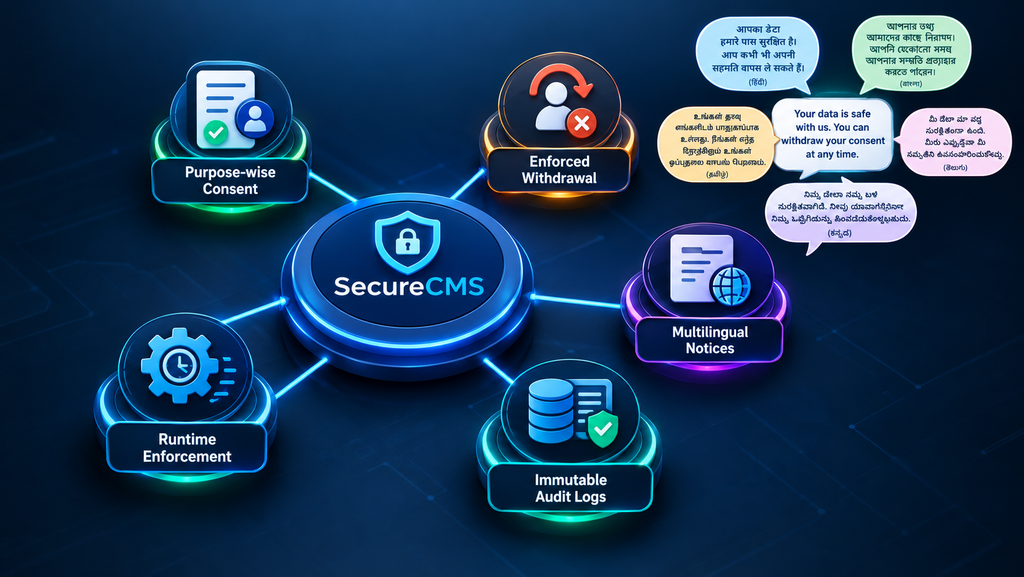
That is where SecureCMS by SecureDApp fits. It is a consent management platform designed around the DPDP consent lifecycle, rather than a cookie tool stretched to cover it. Here is how it maps to each sign.
For bundled consent, SecureCMS supports purpose-wise consent capture. Each purpose gets its own notice, so visitors can accept some and decline others. Consequently, your records show exactly what each person agreed to.
For difficult withdrawal, the platform handles withdrawal and modification as a first-class event. Moreover, revocation is enforced through real-time APIs and SDKs, so your connected systems stop processing when a user withdraws.
For trackers that fire too early, enforcement works at runtime. In other words, your tools check the user’s consent status before they act, instead of relying on a consent banner alone.
For missing proof, SecureCMS keeps immutable audit logs backed by blockchain, drawing on SecureDApp’s security heritage. As a result, every grant, change, and withdrawal becomes a verifiable record. In addition, policy versioning links each consent to the notice the user actually saw.
For unclear notices, the platform manages purpose-specific notices through a data catalogue. Furthermore, it automates data principal rights requests such as access, correction, and erasure, and it supports grievance handling with escalation to your Data Protection Officer.
Notably, none of this removes your own responsibility. Your team still decides what data you collect and why. However, the right platform makes the answers provable, which is exactly what an auditor will ask for.
Conclusion: Fix the System Behind Your Consent Banner
A consent banner is a good start, but it is only a start. The real test is what happens after the click: whether purposes stay separate, whether withdrawal works end to end, whether trackers obey, whether records hold up, and whether users truly understand what they accepted.
Remember the five signs. Bundled purposes. Hard withdrawal. Trackers that fire early. Missing proof. Unclear notices. If even one describes your website, you have a consent problem that no amount of banner design can solve.
The good news is that you have time. With full DPDP obligations arriving in May 2027, this is the right moment to audit, fix, and build something durable. Therefore, start with the self-audit above, and then decide which gaps need proper tooling.
If you want to see how this works in practice, SecureCMS can walk you through purpose-wise consent, enforced withdrawal, and a verifiable audit trail on your own flows. Book a SecureCMS demo and turn your consent banner into real consent infrastructure.
Frequently Asked Questions
1. Is a consent banner enough for DPDP compliance?
No. A consent banner only collects a choice. The DPDP Act also expects specific purposes, easy withdrawal, a clear notice, and proof that consent was obtained. Without those pieces behind the consent banner, your setup is incomplete.
2. What is the most common consent banner mistake?
Bundling every purpose into one “Accept All” button. This weakens the requirement for specific consent and makes withdrawal difficult. Instead, offer separate choices for analytics, advertising, and data sharing.
3. How do I check if my website fires trackers before consent?
Open your site in a fresh private window and watch the network tab in your browser’s developer tools before clicking anything. If analytics or advertising scripts load, they are running without consent and need to be gated.
4. How should I store consent records under the DPDP Act?
Store each event with the user, purpose, timestamp, notice version, and channel, plus every change and withdrawal. Prefer a tamper-evident log, because a record that can be quietly edited is hard to defend during an audit.
5. Can a consent management platform fix these problems?
Yes, when it covers purpose-wise consent, enforced withdrawal, runtime enforcement, audit trails, and rights automation. A platform like SecureCMS is built for this, though your team still defines purposes and data practices.